Spring Boot Shop 프로젝트

팀 프로젝트를 하기 전에 웹 애플리케이션에 대한 기본적인 구상이 필요하다고 생각되서

1
2
3
4
5
6
7
Client(Req) <-> Controller <-> Model <-> View <-> Client(Res) (MVC2구조)

Model (ModelAndView를 사용하면 Model처럼 부여가 가능)

Controller -> Service -> Serviceimpl -> Mapper -> ServiceMapper <-> DB
    |
    +-> View

미니 프로젝트를 하면서 해볼 내용들

대충 구조를 구상했으니 뭘 사용할지 고민을 했다.

인터넷이 급격히 발달하고 ChatGPT도 나온 상황에서 정보는 굉장히 귀중한 자산이 되었다.

이런 정보들을 보호하기 위한 보안도 중요하지 않을까? > 보안 (Spring Security 6:3.1.2)

물론 디자인은 중요하지만 생각보다 귀찮다. > 대신 애니메이션 효과를 추가 (Swiper, gif…)

내가 리펙토링이나 코드 자체를 최적화하는데는 익숙치 않으니 > 이미지 변환(Sejda, DB조회 최소화)

그리고 데이터들의 영속성을 위해 편의성을 주는 프레임워크들(Persistence Framework)

SQL Mapper와 ORM인데 JAVA에서 대표적인 것들이 각각 Mybatis와 JPA

SQL Mapper

Object와 SQL의 필드를 매핑하여 데이터를 객체화 하는 기술

  • 객체와 테이블 간의 관계를 매핑하는 것이 아님
  • SQL문을 직접 작성하고 쿼리 수행 결과를 어떠한 객체에 매핑할지 바인딩 하는 방법
  • DBMS에 종속적인 문제
  • EX) JdbcTemplate, MyBatis

ORM (Object Relational Mapping)

Object와 DB테이블을 매핑하여 데이터를 객체화하는 기술

  • 개발자가 반복적인 SQL을 직접 작성하지 않음
  • DBMS에 종속적이지 않음
  • 복잡한 쿼리의 경우 JPQL을 사용하거나 SQL Mapper을 혼용하여 사용 가능

JPA(ORM) : 자바 ORM의 기술 표준 대표적인 오픈소스로 Hibernate CRUD 메소드 기본 제공 쿼리를 만들지 않아도 됨 1차 캐싱, 쓰기지연, 변경감지, 지연로딩 제공 MyBatis는 쿼리가 수정되어 데이터 정보가 바뀌면 그에 사용 되고 있던 DTO와 함께 수정해주어야 하는 반면에, JPA 는 객체만 바꾸면 된다. 즉, 객체 중심으로 개발 가능 but 복잡한 쿼리는 해결이 어려움

MyBatis(SQL Mapper) 자바에서 SQL Mapper를 지원해주는 프레임워크 SQL문을 이용해서 RDB에 접근, 데이터를 객체화 시켜줌 SQL을 직접 작성하여 쿼리 수행 결과를 객체와 매핑 쿼리문을 xml로 분리 가능 복잡한 쿼리문 작성 가능 데이터 캐싱 기능으로 성능 향상 but 객체와 쿼리문 모두 관리해야함, CRUD 메소드를 직접 다 구현해야함.

이런 식인데 JPA의 경우는 복잡한 쿼리를 하려면 JOOQ나 QueryDSL을 병행해야한다. 하지만 만약 협업을 하고자 할 때는 이것들 전부 알고 가는 것은 힘들다고 생각해서 협업할 때는 Mybatis를 해야할 것 같다.

물론 지금은 빠른 개발을 위해 JPA를 사용할 예정이다.

어쨌든 이것이 내 프로젝트에 설치한 내용들이다.

build.gradle

1
2
3
4
5
6
7
8
9
10
11
12
13
14
15
16
17
18
19
20
21
22
23
24
25
26
27
28
29
30
31
32
33
34
35
36
37
38
39
40
41
42
43
44
45
46
47
48
49
50
51
52
53
54
55
56
57
58
59
60
61
62
63
64
65
66
67
plugins {
	id 'java'
	id 'org.springframework.boot' version '3.2.6'
	id 'io.spring.dependency-management' version '1.1.5'
}

group = 'com.shop'
version = '0.0.1-SNAPSHOT'

java {
	sourceCompatibility = '17'
}

configurations {
	compileOnly {
		extendsFrom annotationProcessor
	}
}

repositories {
	mavenCentral()
}

dependencies {
	// Mybatis
	implementation 'org.mybatis.spring.boot:mybatis-spring-boot-starter:3.0.3'
	
	// JPA
	implementation 'org.springframework.boot:spring-boot-starter-data-jpa'
	implementation 'org.springframework.boot:spring-boot-starter-thymeleaf'
	
	implementation 'org.springframework.boot:spring-boot-starter'
	implementation 'org.springframework.boot:spring-boot-starter-data-jdbc'
	implementation 'org.springframework.boot:spring-boot-starter-jdbc'
	
	implementation 'org.springframework.boot:spring-boot-starter-web'
	implementation 'org.springframework.boot:spring-boot-starter-web-services'
	implementation 'org.springframework.boot:spring-boot-starter-aop'
	
	implementation 'org.springframework.session:spring-session-core'
	implementation 'org.bgee.log4jdbc-log4j2:log4jdbc-log4j2-jdbc4.1:1.16'
	// database 
	implementation 'org.mariadb.jdbc:mariadb-java-client:3.3.3'
	// runtimeOnly 'com.oracle.database.jdbc:ojdbc11'

	// 스프링 시큐리티
	implementation 'org.thymeleaf.extras:thymeleaf-extras-springsecurity6:3.1.2.RELEASE'
	implementation 'org.springframework.boot:spring-boot-starter-security'
	testImplementation 'org.springframework.security:spring-security-test'

	// Mybatis
	implementation 'org.mybatis.spring.boot:mybatis-spring-boot-starter:3.0.3'
	
	compileOnly 'org.projectlombok:lombok'
	developmentOnly 'org.springframework.boot:spring-boot-devtools'
	
	annotationProcessor 'org.springframework.boot:spring-boot-configuration-processor'
	annotationProcessor 'org.projectlombok:lombok'
	
	testImplementation 'org.springframework.boot:spring-boot-starter-test'
	testRuntimeOnly 'org.junit.platform:junit-platform-launcher'
}

tasks.named('test') {
	useJUnitPlatform()
}

가장 중요하다고 판단한 내용은 우선 기본 틀이다.

실제화면

사실 JWT 토큰을 적용할까 생각도 했었지만 이 부분은 다른 곳에서 다룰 예정이다.

우선 해당 프로젝트에는 스프링 시큐리티라는 스프링 하위 프레임워크이다.

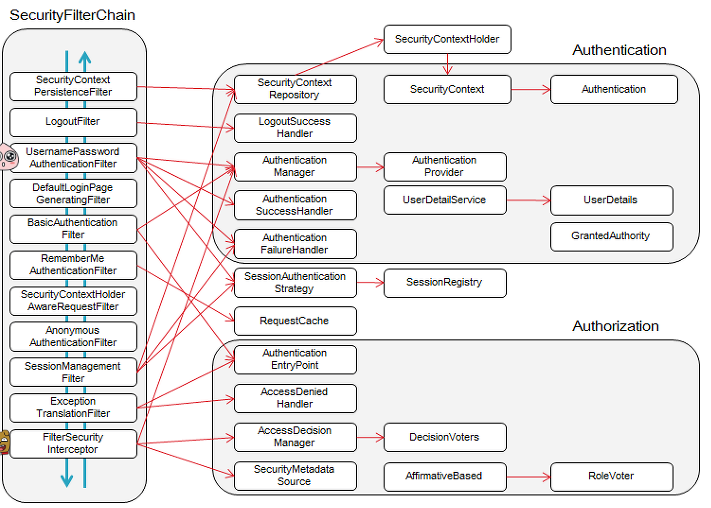
인증(Authentication) 인증은 사용자의 신원을 입증하는 과정이다. 쉽게 말하면 우리가 흔히 어떤 사이트에 아이디와 비밀번호를 입력하고 로그인하는 과정이다.

인가(Authorization) 인가는 사용자의 권한을 확인하는 작업이다. 이것도 쉽게 말하면 파일 공유 시스템에서 권한 별로 접근할 수 있는 폴더가 상이하다. 상위직책자는 들어갈 수 있고, 하위 직책자는 접근할 수 없는 경우 사용자의 권한을 확인해야 하는데 이 과정을 인가라고 한다.
실제화면

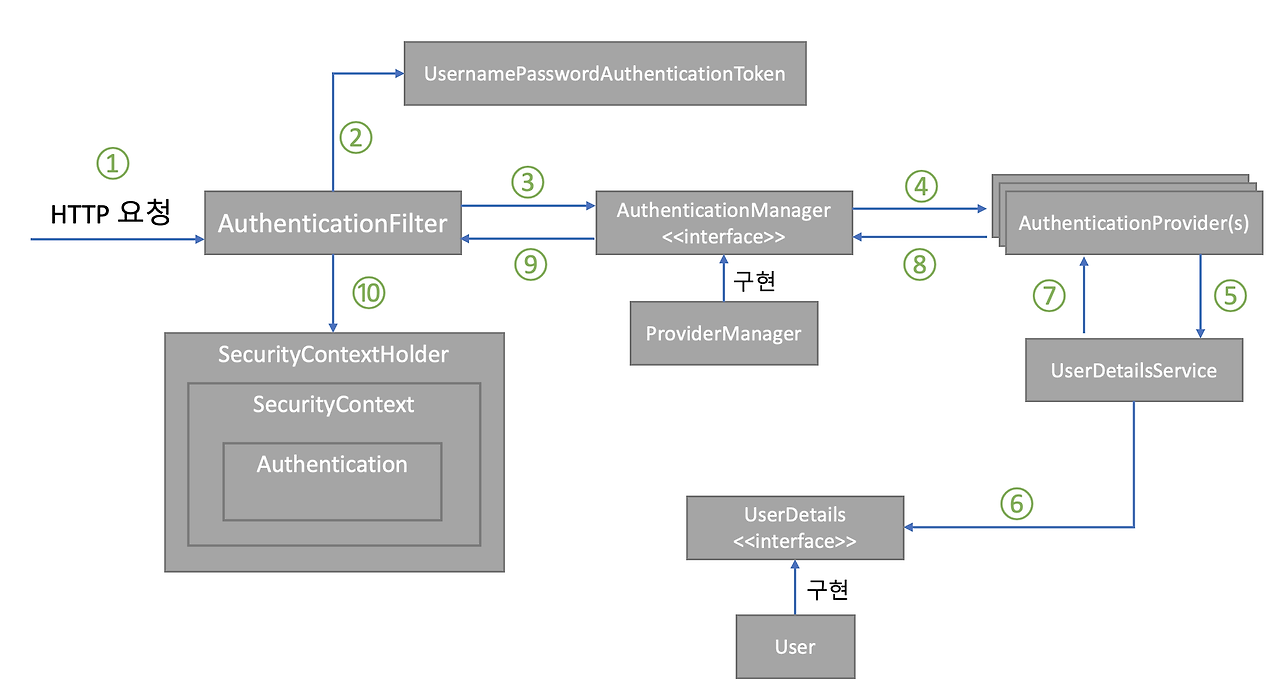
스프링 시큐리티 인증 처리 과정

실제화면

  1. 사용자가 폼에 아이디, 패스워드를 입력하면 HTTPServletRequest에 아이디, 비밀번호 정보가 전달된다. 이때 AuthenticationFilter가 넘어온 아이디와 비밀번호의 유효성 검사를 실시한다.
  2. 유효성 검사 후 실제 구현체인 UsernamePasswordAuthenticationToken을 만들어 넘겨준다.
  3. 인증용 객체인 UsernamePasswordAuthenticationToken을 AuthenticationManager에게 전달한다.
  4. UsernamePasswordAuthenticationToken을 AuthenticationProvider에게 전달한다.
  5. 사용자 아이디를 UserDetailsService로 보낸다. UserDetailService는 사용자 아이디로 찾은 사용자의 정보를 UserDetails 객체로 만들어 AuthenticationProvider에게 전달한다.
  6. DB에 있는 사용자 정보를 가져온다.
  7. 입력 정보와 UserDetails의 정보를 비교해 실제 인증 처리를 진행한다.
  8. ~ 10까지 인증이 완료되면 SecurityContextHolder에 Authentication을 저장한다. 인증 성공 여부에 따라 성공 시 AuthenticationSuccessHandler, 실패 시 AuthenticationFailureHandler 핸들러를 실행한다.

UserVo.java

1
2
3
4
5
6
7
8
9
10
11
12
13
14
15
16
17
18
19
20
21
22
23
24
25
26
27
28
29
30
31
32
@Table(name="User")
@Entity
@Data
@Builder
@NoArgsConstructor
@AllArgsConstructor
public class UserVo {
	@Id
	@GeneratedValue(strategy = GenerationType.IDENTITY)
	private int id;
	
	@Column(unique = true) // username 중목 안됨
	private String username;
	
	private String email;
	private String password;
	private String address;
	
	// 로그인 횟수, 잠금 시간, 수정시간 생각 필요 (추가할지 고민)
	
	private String role; // 권한

    private LocalDateTime createDate; // 날짜

    @PrePersist // DB에 INSERT 되기 직전에 실행. 즉 DB에 값을 넣으면 자동으로 실행됨
    public void createDate() {
        this.createDate = LocalDateTime.now();
    }

    @OneToOne(mappedBy = "user")
    private CartVo cart;
}

Mybatis랑 JPA랑 병행하고 싶어서 나눠놓았다.

PrincipalDetails.java

UserDetails 클래스는 스프링 시큐리티에서 사용자의 인증 정보를 담아 두는 인터페이스이므로 필수 오버라이드 메서드가 많다.

1
2
3
4
5
6
7
8
9
10
11
12
13
14
15
16
17
18
19
20
21
22
23
24
25
26
27
28
29
30
31
32
33
34
35
36
37
38
39
40
41
42
43
44
45
46
47
@Data
public class PrincipalDetails implements UserDetails {
	
	private static final long serialVersionUID = 1L;
	private UserVo user;
	
	public PrincipalDetails(UserVo user) {
		this.user = user;
	}
	
	@Override
	public Collection<? extends GrantedAuthority> getAuthorities() {
		Collection<GrantedAuthority> collections = new ArrayList<>();
		collections.add(() -> user.getRole());
		return collections;
	}
	
	@Override
	public String getPassword() {
		return user.getPassword();
	}

	@Override
	public String getUsername() {
		return user.getUsername();
	}
	
	@Override
	public boolean isAccountNonExpired() {
		return true;
	}
	
	@Override
	public boolean isAccountNonLocked() {
		return true;
	}
	
	@Override
	public boolean isCredentialsNonExpired() {
		return true;
	}
	
	@Override
	public boolean isEnabled() {
		return true;
	}
}

Repository 생성

스프링 시큐리티를 이용해 사용자 정보를 가져오기 위해서는 스프링 시큐리티가 이메일을 전달받아야 한다.

UserRepo.java

1
2
3
4
5
6
@Repository
public interface UserRepo extends JpaRepository<UserVo, Integer> {
	Optional<UserVo> findByUsername(String username);

	Optional<UserVo> findById(Long id);
}

Service 생성

UserDetailsService 인터페이스를 구현하고, loadUserByUsername() 메서드를 오버라이딩해서 사용자 정보를 가져오는 로직을 작성한다.

PrincipalDetailsService.java

1
2
3
4
5
6
7
8
9
10
11
12
13
14
15
16
17
18
19
@Slf4j
@Service
public class PrincipalDetailsService implements UserDetailsService {

    @Autowired
    private UserRepo userRepo;


    @Override
    public UserDetails loadUserByUsername(String username) throws UsernameNotFoundException {
        Optional<UserVo> userEntityOptional = userRepo.findByUsername(username);
        if (userEntityOptional.isEmpty()) {
            throw new UsernameNotFoundException("User not found with username: " + username);
        }
        UserVo userEntity = userEntityOptional.get();
        // log.info("USER INFO ===> "+userEntity);
        return new PrincipalDetails(userEntity);
    }
}

SecurityConfig.java

1
2
3
4
5
6
7
8
9
10
11
12
13
14
15
16
17
18
19
20
21
22
23
24
25
26
27
28
29
30
31
32
33
34
35
36
37
38
39
40
41
42
43
44
45
46
47
48
49
50
51
52
53
54
55
56
57
@EnableWebSecurity
@Configuration
public class SecurityConfig {
	
	@Autowired
	private UserDetailsService userService;
	
	@Bean	// 특정 Http 요청에 대한 웹 기반 보안 구성. 인증/인가 및 로그인 및 로그아웃 설정
	public SecurityFilterChain filterChain(HttpSecurity http) throws Exception {
		HttpSessionRequestCache requestCache = new HttpSessionRequestCache();
		requestCache.setMatchingRequestParameterName(null);
		
		http.cors(Customizer.withDefaults())
			.csrf(csrf -> csrf.disable())
			.requestCache(request -> request.requestCache(requestCache))
			.httpBasic(httpBasic -> httpBasic.disable())
			.sessionManagement((session) -> session
					.sessionCreationPolicy(SessionCreationPolicy.IF_REQUIRED))
			.formLogin(formlogin -> 
				formlogin.loginPage("/signin")
						 .loginProcessingUrl("/signin")
						 .usernameParameter("username")
						 .passwordParameter("password")
						 .defaultSuccessUrl("/main", true).permitAll())
			.logout(logout -> logout
					.logoutUrl("/logout")
					.logoutSuccessUrl("/signin")
					.invalidateHttpSession(true))
			.authorizeHttpRequests(authReq ->
					authReq.requestMatchers("/", "/main", "/itemView","/itemView?id=*", "/signin", "/signup", "/uploads/**").permitAll()
					.requestMatchers(PathRequest.toStaticResources().atCommonLocations()).permitAll()
					.anyRequest().authenticated());
		return http.build();
	}
	
	@Bean	// 비밀번호 암호화를 위한 빈 등록
	public BCryptPasswordEncoder bCryptPasswordEncoder() {
		return new BCryptPasswordEncoder();
	}
	
	@Bean	// static이나 넘아가야할 파일 등록
	public WebSecurityCustomizer webSecurityCustomizer() {
		return (web) -> web.ignoring()
				.requestMatchers(PathRequest.toStaticResources().atCommonLocations());
	}
	
	@Bean	// 인증관리자 설정
	public DaoAuthenticationProvider daoAuthenticationProvider() throws Exception {
		DaoAuthenticationProvider daoAuthenticationProvider = new DaoAuthenticationProvider();
		
		daoAuthenticationProvider.setUserDetailsService(userService);
		daoAuthenticationProvider.setPasswordEncoder(bCryptPasswordEncoder());
		
		return daoAuthenticationProvider;
		
	}
}

configure() : 스프링 시큐리티의 모든 기능(인증, 인가)을 사용하지 않게 설정. requestMatchers() : 특정 요청과 일치하는 url에 대한 액세스 설정 ignoring() : requestMatchres()에 적힌 url에 대해 인증, 인가 서비스를 적용 X filterChain() : 특정 HTTP 요청에 대해 웹 기반 보안 구성. 인증/인가 및 로그인, 로그아웃 설정 permitAll() : 누구나 접근 가능. requestMatchers()에 기재된 url은 인증, 인가 없이도 접근 가능 anyRequest() : 해당 코드 윗 줄에서 설정한 url 이외의 요청에 대해 설정 authenticated() : 인가는 필요하지 않지만 인증이 필요 loginPage() : 로그인 페이지 설정 defaultSuccessUrl() : 로그인 성공 시 이동할 경로 logoutSuccessUrl() : 로그아웃 성공 시 이동할 경로 invalidateHttpSession() : 로그아웃 이후에 세션 전체 삭제 여부 csrf().disable() : CSRF 설정 비활성화. 원래는 CSRF 공격을 방지하기 위해 활성화하는 게 좋다 daoAuthenticationProvider() : 인증 관리자 설정. 사용자 정보를 가져올 서비스를 재정의하거나, 인증 방법 등을 설정 setUserDetailsService() : 사용자 정보를 가져올 서비스를 설정. 이때 설정하는 서비스 클래스는 반드시 UserDetailsService를 상속받은 클래스여야 한다. setPasswordEncoder() : 비밀번호 암호화를 위한 인코더 설정 bCryptPasswordEncoder() : 비밀번호 암호화를 위한 빈 등록

signupDto.java

1
2
3
4
5
6
7
8
9
10
11
12
13
14
15
16
@Data
public class signupDto {
    private String username;
    private String password;
    private String email;
    private String name;

    public UserVo toEntity() {
        return UserVo.builder()
                .username(username)
                .password(password)
                .email(email)
                .username(name)
                .build();
    }
}

AuthService.java

패스워드를 BCryptPasswordEncoder를 사용해서 암호화한 후에 저장한다.

1
2
3
4
5
6
7
8
9
10
11
12
13
14
15
16
17
18
19
20
21
22
23
24
25
@Service
public class AuthService {
	
	@Autowired
    private UserRepo userRepository;
	
	@Autowired
    private BCryptPasswordEncoder bCryptPasswordEncoder;

    @Transactional // Write(Insert, Update, Delete)
    public UserVo signup(UserVo user) {
        String rawPassword = user.getPassword();
        String encPassword = bCryptPasswordEncoder.encode(rawPassword);
        user.setPassword(encPassword);
        user.setRole("ROLE_USER");

        UserVo userEntity = userRepository.save(user);
        
        return userEntity;
    }
    
    public void logout(HttpSession session) {
    	session.invalidate();
    }
}

AuthController.java

1
2
3
4
5
6
7
8
9
10
11
12
13
14
15
16
17
18
19
20
21
22
23
24
25
26
27
28
29
30
31
32
33
34
35
36
37
38
39
40
41
42
43
44
@Slf4j
@RequiredArgsConstructor
@Controller
public class AuthController {
	
	@Autowired
	private AuthService authService;
	
	@GetMapping("/signin")
	public String signin() {
		return "Main/signin";
	}

	@GetMapping("/signup")
	public String signup() {
		return "Main/signup";
	}
	
	@PostMapping("/signup")
    public String signUpPost(signupDto signupDto) {
        UserVo user = signupDto.toEntity(); //새로운 유저 받음
        
        UserVo userEntity = authService.signup(user);
        log.info("newUser ==> " + userEntity);

        return "Main/signin";
    }

    // 로그인성공 창에서 로그아웃 버튼
    //@RequestMapping(value="logout", method = RequestMethod.GET)
    @GetMapping("/logout")
    public String logout(HttpSession session) throws Exception {
        authService.logout(session);
        return "redirect:/signin";
    }

		// 로그아웃의 다른 구현 방법
		// @GetMapping("/logout")
		// public String logout(HttpServletRequest request, HttpServletResponse response) {
		//		new SecurityContextLogoutHandler().logout(request, response,
		//						SecurityContextHolder.getContext().getAuthentication());
		//		return "redirect:/login";
		// }
}

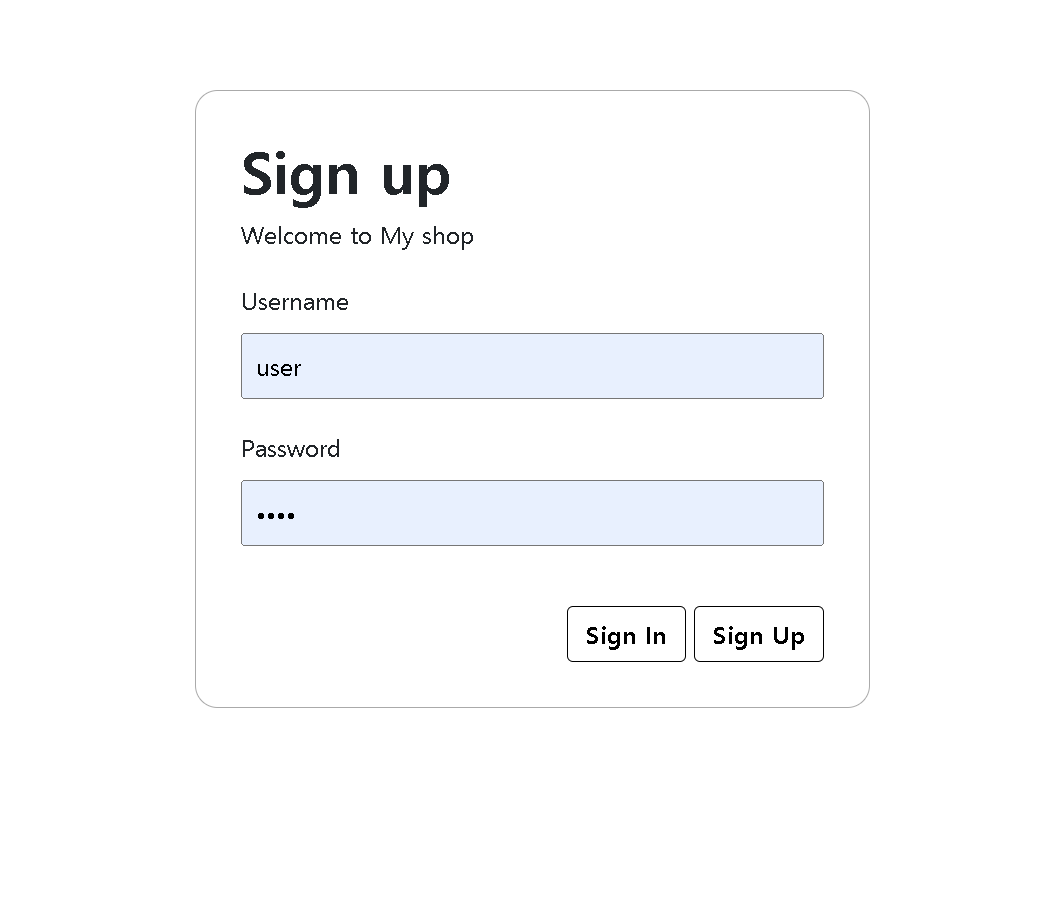
회원가입 화면

실제화면

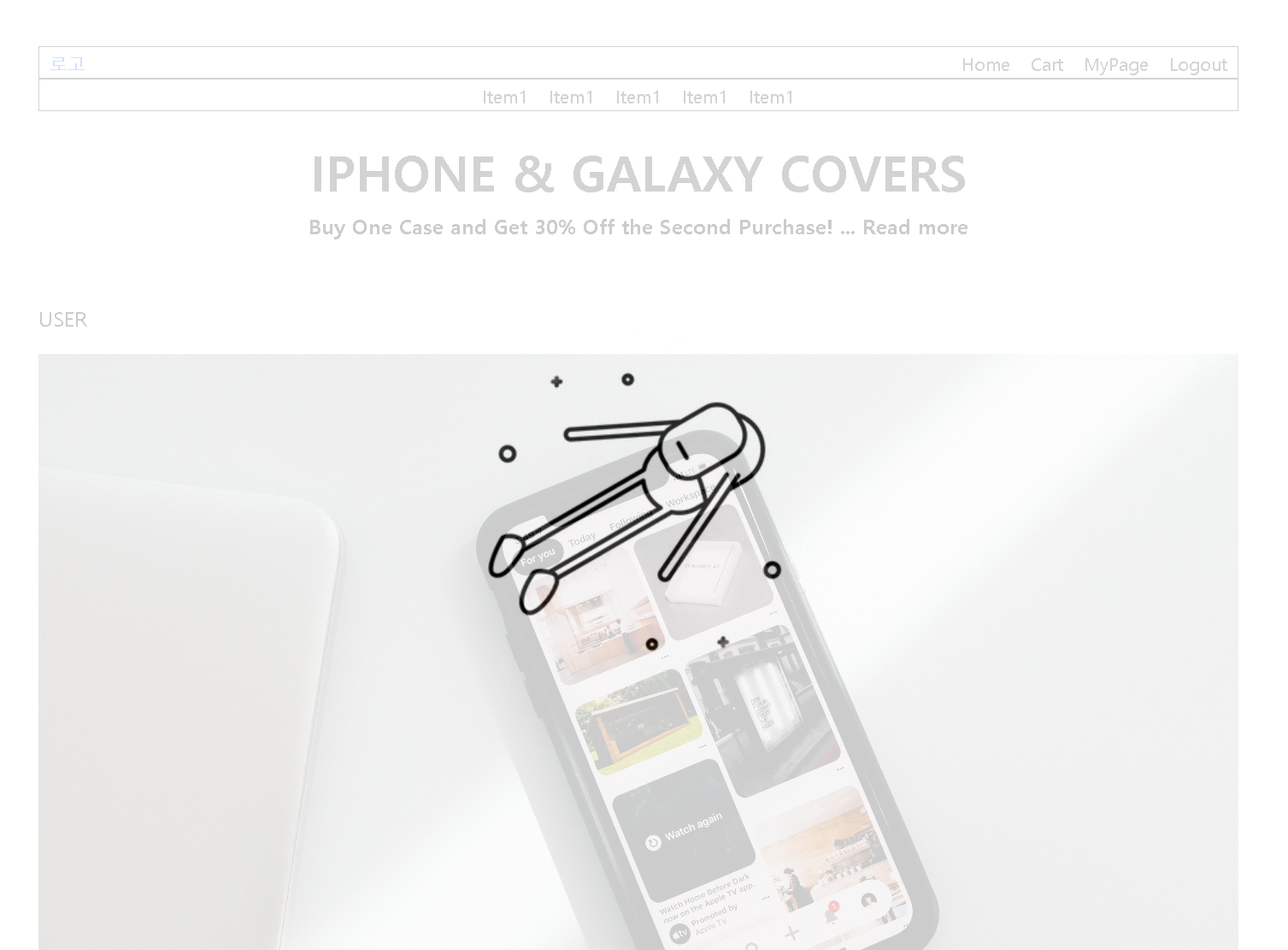
성공시 화면

성공시 header 부분이 변경된 걸 볼 수 있는데 Main페이지에는 loading 시 심심하지 않도록 gif를 넣어놓았다.
실제화면

그냥 JavaScript로 구현한 것이다. 아래에 코드를 첨부한다. (Jquery를 사용했다. 최근에는 그냥 JavaScript로도 작성할 수 있다고 하니 다음에는 Jquery를 사용하지 않고 해보도록 하겠다.)

HomePage.html

1
2
3
<div class="load" id="load">
	<img src="images/loading2.webp">
</div>

layout.js

1
2
3
4
5
6
7
8
9
10
$(function() {
	$('#signin').on("click", () => {
		$("form[name=sign]").attr('action', "signin")
		$("form[name=sign]").submit();
	});
	
	$(document).ready(function(){
		$('#load').delay('1000').fadeOut();
	});
})

Main화면을 보면 상품들이 있는 것을 알 수 있는데 Controller 내용은 이렇고

1
2
3
4
5
6
7
8
9
10
11
12
13
14
15
16
17
18
19
20
21
22
23
// 메인 페이지 (로그인 유저) - ADMIN, USER
@GetMapping("/main")
public String Home(Model model, @AuthenticationPrincipal PrincipalDetails principalDetails) {
	List<ItemVo> items = itemService.TotalitemView();
	model.addAttribute("items", items);
	String page = null;
	String content = null;
	if(principalDetails.getUser().getRole().equals("ROLE_ADMIN")) {
					// ADMIN
		content = "user/Home";
		model.addAttribute("user", principalDetails.getUser());
		model.addAttribute("content", content);
		page = "admin/Main";
	} else if (principalDetails.getUser().getRole().equals("ROLE_USER")) {
		// USER
		content = "user/Home";
		model.addAttribute("user", principalDetails.getUser());
		model.addAttribute("content", content);
		page = "user/Main";
	}
	
	return page;
}

Item의 테이블도 이러하다.

1
2
3
4
5
6
7
8
9
10
11
12
13
14
15
16
17
18
19
20
21
22
23
24
25
26
27
28
29
30
31
32
33
34
35
36
37
38
39
40
41
42
43
@Table(name="Item")
@Entity
@Getter
@Builder
@AllArgsConstructor
@NoArgsConstructor

public class ItemVo {
	@Id
	@GeneratedValue(strategy = GenerationType.IDENTITY)
	private int id;
	
	private String kind;	// 상품 종류
	
	private String name;	// 상품 이름
	
	private String detail;	// 상품 설명
	
	private int item_price;	// 상품 가격
	
	private int stock; // 재고
	
	private int isSoldout; // 재고 없을 때 : 1
	
	@ManyToOne
	@JoinColumn(name="user_id")
	private UserVo user;	// 판매자 아이디
	

	@OneToMany(mappedBy="item") 
	private List<CartItemVo> cart_items = new ArrayList<>(); 
	
	private String imgName; // 상품 사진
	private String imgPath;	
	
	@DateTimeFormat(pattern = "yyyy-mm-dd")
    private LocalDate createDate; // 상품 등록 날짜

    @PrePersist // DB에 INSERT 되기 직전에 실행. 즉 DB에 값을 넣으면 자동으로 실행됨
    public void createDate() {
        this.createDate = LocalDate.now();
    }	
}

ItemService.java

1
2
3
public interface ItemService {
	List<ItemVo> TotalitemView();
}

ItemServiceImpl.java

1
2
3
public List<ItemVo> TotalitemView() {
	return itemRepo.findAll();
}

사실 기능이 있는 추가코드가 많은데 아직 넣지 않은 이유는 JPA와 JOOQ는 멀티 모듈을 사용해야하고

그냥 Query 어노테이션을 사용하자니 어플레케이션 구동 시점에서 결과를 확인할 수 있어서 불편하고

JPA Criteria Query는 사용방법이 복잡하여 실행하고자 하는 JPQL을 직관적으로 알기 어렵습니다

그래서 QueryDSL이나 Mybatis를 병행해서 시도해볼 예정입니다.

보여지는 홈페이지에는 ThymeLeaf를 사용해서 구현되어 있습니다.

또한 옛날 thymeLeaf와 import하는 방식이 달라서 최신 문서를 보고 시도하셔야 합니다.

Main.html

1
2
3
4
5
6
7
8
9
10
11
12
13
14
15
16
17
18
19
20
21
22
23
24
25
26
<!DOCTYPE html>
<html xmlns:th="http://www.thymeleaf.org"
	  xmlns:sec="http://www.thymeleaf.org/extras/spring-security">

<head>
    <title>Main</title>
    <meta charset="UTF-8">
    <link rel="stylesheet" href="../css/bootstrap.min.css" />
    <link rel="stylesheet" href="../css/layouts.css" />
    <link rel="stylesheet" href="../css/swiper.css" />
    <script type="text/javascript" src="../js/jquery-3.7.1.min.js"></script>    
    <script type="text/javascript" src="../js/layout.js"></script>
</head>
<body>
<div class="large-container">
	<div class="container" style="">
		<th:block class="--header" th:replace="~{layouts/header :: header}"></th:block>
		<div class="content">
			<th:block class="--Home" th:replace="~{layouts/HomePage :: Home}"></th:block>			
		</div>
	    <p th:text="'Message: ' + ${message}">Message will appear here</p>
	</div>
	<th:block class="--footer" th:replace="~{layouts/footer :: footer}"></th:block>
</div>
</body>
</html>

HomePage.html

1
2
3
4
5
6
7
8
9
10
11
12
13
14
15
16
17
18
19
20
21
22
23
24
25
26
27
28
29
30
31
32
33
34
35
36
37
38
39
40
41
42
43
44
45
46
47
48
49
50
51
52
53
54
55
56
57
58
59
60
61
62
63
64
65
66
67
68
69
70
71
72
73
74
75
76
77
78
79
80
81
82
83
84
85
86
87
88
89
90
91
92
93
94
95
96
97
98
99
100
101
102
103
<!DOCTYPE html>
<html xmlns:th="http://www.thymeleaf.org"
	  xmlns:sec="http://www.thymeleaf.org/extras/spring-security">

<head>
    <title>Main</title>
    <meta charset="UTF-8">
    <link rel="stylesheet" href="../css/bootstrap.min.css" />
    <link rel="stylesheet" href="../css/layouts.css" />
    <link rel="stylesheet" href="../css/swiper.css" />
    <script type="text/javascript" src="../js/jquery-3.7.1.min.js"></script>    
    <script type="text/javascript" src="../js/layout.js"></script>
    <script type="text/javascript" src="../js/item.js"></script>
</head>
<body>
<div class="large-container">
	<div class="container" style="">
		<th:block class="--header" th:replace="~{layouts/header :: header}"></th:block>
		<div class="content">
			<th:block class="--swiper" th:replace="~{layouts/swiper :: swiper}"></th:block>
			<p>Items</p>
			<div class="site-desc">
				<section class="site-desc-direction">
					<div class="TwoColumn-Sec">
						<div class="TwoColumn-Sec-Col">
							<div class="TwoCol-Sec-MediaContainer">
								<img class="colimg" src="images/cont2.jpg">
							</div>
						</div>
						<div class="TwoColumn-Sec-Col">
							<div class="TwoCol-Sec-MediaContainer">
								<div class="Cols-Title mb-4">
									<h1>What We Stand For</h1>
								</div>
								<div class="Cols-event-Item">
									<div class="Cols-icon">
										<img src="images/icon1.png">
									</div>
									<div class="Cols-context mb-1">
										<h2>IMPACT PROTECTION</h2>
										<p>Pioneering impact protection technology that protects your devices like no other.</p>
									</div>
								</div>
								<div class="Cols-event-Item">
									<div class="Cols-icon">
										<img src="images/icon2.png">
									</div>
									<div class="Cols-context mb-1">
										<h2>SUSTAINABILITY</h2>
										<p>From recycled materials to intelligent bio-technology formulas, we protect your tech and our planet.</p>
									</div>
								</div>
								<div class="Cols-event-Item">
									<div class="Cols-icon">
										<img src="images/icon3.png">
									</div>
									<div class="Cols-context mb-1">
										<h2>DESIGN INNOVATION</h2>
										<p>Whether it’s product design or lab-developed material additives, we are always innovating our products.</p>
									</div>
								</div>
								
							</div>
						</div>
					</div>
				</section>
			</div>
			<div>
				<div class="Item-container">
					<div class="Item-card iDetail" th:each="item : ${items}">
						<input name="iid" type="hidden" th:value="${item.getId()}">
						<!-- <a class="goto-item" th:href="@{itemView/{id}(id=${item.getId()})}"></a> -->
						<div class="item-img-contain">
							<img class="item-img" th:src="@{${item.getImgPath()}}" alt="..." />
						</div>
						<div class="item-text">
							<p class="item-kind item-context" th:text="${item.getKind()}"></p>
							<p class="item-name item-context" th:text="${item.getName()}"></h3>
							<p class="item-value item-context" th:text="'$'+${item.getItem_price()}"></p>
						</div>
						
					</div>
					
					
				</div>
				<div align="right">
					<!-- <a href="/itemNew">
						<button type="button" id="AddItem">Add Item</button>
					</a> -->
				</div>
			</div>
			<p>Ads</p>
			
		</div>
	    <p th:text="'Message: ' + ${message}">Message will appear here</p>
	</div>
	<th:block class="--footer" th:replace="~{layouts/footer :: footer}"></th:block>
</div>
<div class="load" id="load">
	<img src="images/loading2.webp">
</div>
</body>
</html>

추후에 내용들을 더 업데이트 하도록 하겠습니다.

해당 내용들의 코드는 제 깃허브 링크를 타고 가시면 쉽게 찾아볼 수 있습니다.

현재 포스트 코드